How to Create a YouTube Media Kit That Brands Want?
Learn how to create a YouTube media kit that brands want: what to include, which numbers matter, how to design it and how to send it, with a simple example.
· 8 min read
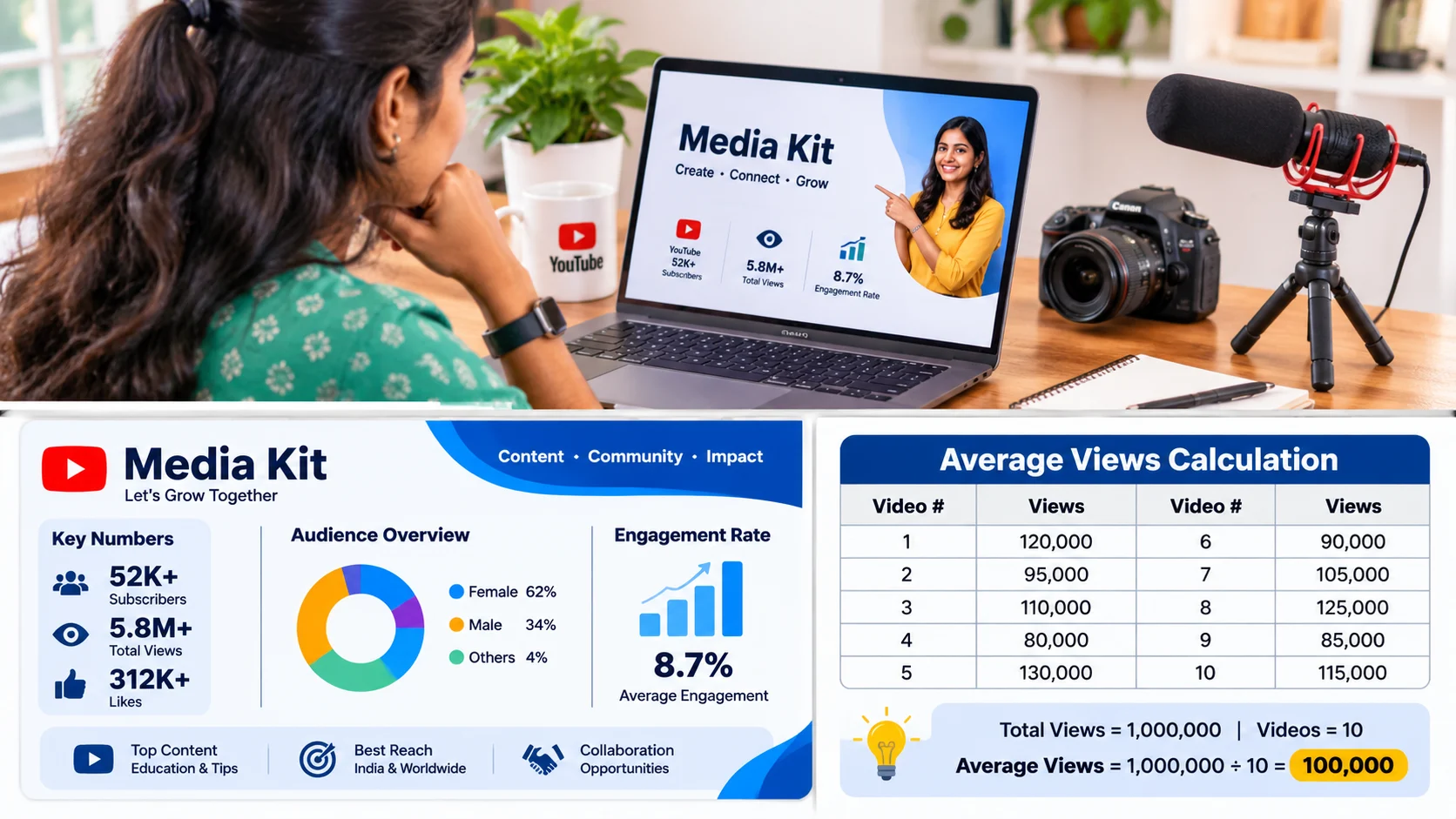
A YouTube media kit is a short, one- or two-page summary of your channel that helps a brand decide quickly. Include who you are, your recent average views, your audience details (country, age, gender), your best videos, any past brand work, the ways a brand can work with you, and your contact details. Keep the numbers recent and honest, and do not lead only with your subscriber count.
A media kit is a professional snapshot of your profile, audience, achievements, and brand collaboration opportunities. A guest does not want to hear a long story. They want to see what is available, what it looks like, and how to order. Brands think the same way. A marketing person may check ten channels in one afternoon, so your media kit should answer their main questions in two minutes.
This guide shows you, step by step, how to build one. It works for YouTubers from any country and any niche.
Why brands ask for a media kit
When a brand writes to you, they usually need to decide three things: is your audience the same as our customers, will people really watch our message, and is this creator easy and professional to work with? A good media kit answers all three before the first reply.
It also saves time for both sides. You do not need to type the same details again and again, and the brand does not need to dig through your channel and your analytics.
8 things to include in your YouTube media kit
1. A short introduction
Two or three lines: your name, your channel name, your niche, the language you speak, and what viewers get from your channel. Add a clear channel banner.
2. Your key numbers
Put the numbers brands care about in one box where they are easy to see:
Subscribers
Average views on your last 10 to 15 long videos
Average views on your Shorts, shown separately
Average view duration or average percentage viewed How often you upload
Lead with your average views and not only the subscriber count. A channel with fewer subscribers but steady, interested viewers can look better than a bigger one with weak views.
3. Your audience details
Show your top countries, your main age group, the gender split, and the language your viewers speak. In YouTube Studio, go to Analytics and then the Audience tab, which shows who is watching your videos, including age, gender and where your viewers are. YouTube also notes that some details, such as geography or gender, can be limited in some cases (YouTube Help). If a number is missing, say so honestly or leave it out.
4. Your niche and content style
List your three or four main topics, and say what makes your channel different. For example: "simple home workouts for busy parents" is much clearer than "fitness and lifestyle".
5. Your best videos
Choose three videos that show your normal level of performance, not only one big viral hit. Add the title, a small thumbnail, the views and a one-line reason why it works. If you show only your best video, a smart brand will notice.
6. Past brand work or sample content
If you have worked with brands, add their names, what you made and the result, such as views, clicks or comments. If you are new, show a sample: a video where you naturally review a product you already use. This tells brands that you know how to do it.
7. Ways to work together
List the formats you offer, for example: a dedicated video, a mention inside a video, a Short, or a
community post. You can also mention longer partnerships. Whether to put prices in the kit is your choice. Many creators write "rates on request" because the price depends on the work, the usage rights and the timeline.
8. Contact details and links
Add your business email, your channel link, your other platforms, and your Thayyal creator profile link if you have one. Make it easy for a brand to say yes.
How to find your numbers: a simple example
Open YouTube Studio, go to Analytics, and set the date range to the last 28 or 90 days. Check the views of your last 10 long videos. Add them up and divide by 10 to get your average.
For example (these numbers are only to explain the method):
Video | Views |
1 | 4,200 |
2 | 3,800 |
3 | 5,100 |
4 | 2,900 |
5 | 4,600 |
6 | 3,300 |
7 | 6,000 |
8 | 3,700 |
9 | 4,000 |
10 | 4,400 |
The total is 42,000 views, so the average is 4,200 views per video. Always use your own real numbers, and update them each time you send the kit.
How to design it
You do not need to be a designer. These simple rules are enough:
Keep it to one or two pages. Brands will not read a long document.
Use two or three colours and one or two fonts. Match your channel look.
Use clear headings and short lines. Big numbers are easier to read than long paragraphs.
Add a few thumbnails or screenshots. Pictures make it feel real.
Save it as a PDF and keep the file size small, so it opens easily on a phone. You can also keep a web page version.
Write the date on it. This shows the numbers are fresh.
Mistakes that make brands lose interest
Showing lifetime views or total views instead of recent averages
Mixing Shorts views with long video views so the numbers look bigger
Old numbers from last year
Big claims that you cannot prove
Hiding your audience country or age because it is not impressive A kit that is too long, too crowded, or has no contact details
Honest numbers build trust. If a brand later checks your analytics and finds a difference, you may lose the deal and the relationship.
How to send your media kit
Do not just attach it to an empty email. Add a short message that is personal and clear:
Hi [Name], I'm [Your name], the creator of [Channel name], a YouTube channel about [niche]. I've watched your [product or campaign], and I think my viewers, who are mostly [audience description], would enjoy it. My recent videos average [number] views. I've attached my media kit with my audience details and a few ideas. Interested in partnering with us? Let's start a conversation. Thank you for your time!
If you do not hear back, send one polite reminder after a week or two.
Remember to disclose sponsored videos
When a brand pays you, in money or with free products, tell your viewers. YouTube has a setting to mark that your video contains paid promotion, such as a product placement, sponsorship or endorsement, and YouTube says it is your responsibility to follow the laws and rules that apply to you (YouTube Help). Using this setting, and also saying it clearly in your video, builds trust with your viewers and with brands.
Keep your media kit fresh
Update your numbers before you send the kit to a new brand, and at least once a month if you are pitching regularly. Add new brand work, new top videos and any growth. A fresh kit shows that you are active and serious.
How Thayyal helps creators
Your media kit is your summary, and your online profile is the place brands can visit any time. On Thayyal, you can build a creator profile, show your work and the platforms you create on, and discover brand opportunities that fit your niche. Add your Thayyal profile link in your media kit and your email signature so that brands can see more of your work in one click.
FAQ
What is a YouTube media kit?
A YouTube media kit is a short document, It includes your key numbers, audience details, best videos, past brand work, the ways you can work together and your contact details.
What should I include in a YouTube media kit?
Include a short introduction, your subscribers and recent average views, audience details like top countries and age group, your niche, three typical videos, past brand work or a sample, the formats you offer, and your contact details.
How many subscribers do I need to make a media kit?
There is no minimum. If you have a clear niche and steady views, you can create one early. Brands care about the quality and interest of your audience, so a small channel with real viewers can still make a good kit.
Should I put my rates in my media kit?
It is up to you. Many creators write "rates on request", because the price depends on the type of video, the usage rights and the timeline. If you do share prices, make clear what is included, such as one dedicated video and one round of changes.
How long should a YouTube media kit be?
Keep it short, tidy and easy to read on a phone, with the most important numbers at the top.
How often should I update my media kit?
Update it, you send it to a new brand, and at least once a month if you are actively pitching. Old numbers make brands think your channel is no longer active.
Final thoughts
A good YouTube media kit is not about showing off. It is about making a brand's decision easy. Keep it short, honest and fresh, lead with your recent average views and audience fit, and show that you can promote a product naturally. Once your kit is ready, you will feel more confident every time you write to a brand.
Ready to meet brands? Join Thayyal as a Creator, build your profile and discover opportunities that fit your niche. And if you are a brand looking for creators, start with Thayyal too.
Instagram brand collaborations guide for beginners